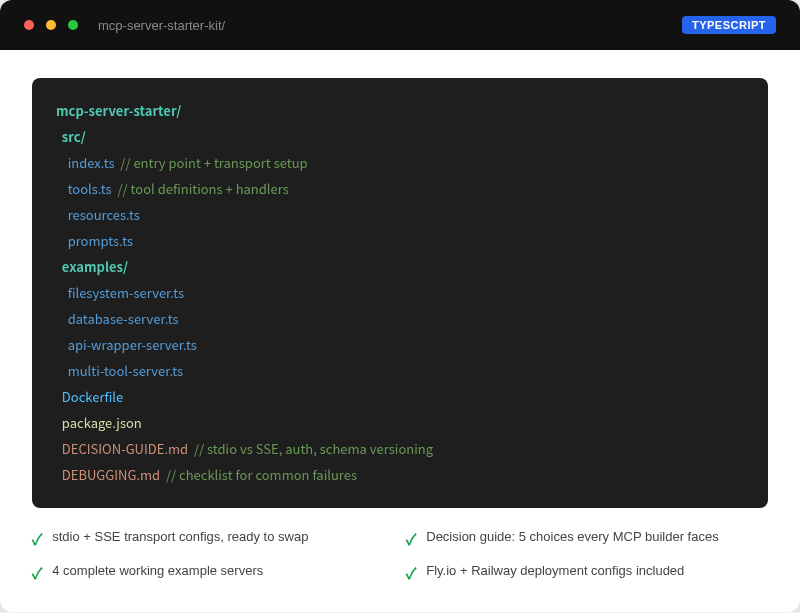
What's in the kit — TypeScript template, 4 example servers, decision guide, debugging checklist
A TypeScript template, a decision guide for the choices that trip people up, four complete example servers, and a debugging checklist. Enough to connect Claude to your own tools and data without reading the spec first.
→ Refund if it's not what you expected. No time limit, no questions
→ Use code LAUNCH for 20% off. First 25 buyers · expires ...
What's in the kit — TypeScript template, 4 example servers, decision guide, debugging checklist
A complete TypeScript MCP server, ready to clone. Includes three working tool examples (fetch URL, read file, call API), one resource example, one prompt example, proper MCP-formatted error handling, Zod input validation, and both stdio and SSE transport support.
Covers the five decisions that slow people down: stdio vs SSE transport, tools vs resources vs prompts, authentication approaches, error handling patterns, and schema versioning. Each section gives you the rule, not just the options.
File System Server (sandboxed read/write, path traversal prevention), REST API Wrapper (input validation, rate limiting, response transformation), Database Reader (PostgreSQL, connection pooling, pagination), and Multi-Tool Agent Server (tool sequencing, state across calls, long-running operations).
Step-by-step instructions for four environments: Claude Desktop (local stdio), Fly.io (SSE, free tier, includes Dockerfile and fly.toml), Railway (SSE, easier setup), and self-hosted systemd service. Each guide goes from zero to running.
The 12 most common MCP server failures with fixes: server not appearing in Claude Desktop, empty tool results, schema validation errors, session drops, missing environment variables, stale resource caches, streaming cutoffs, permission errors, SSL issues, concurrent request handling, and memory leaks.
server.setRequestHandler(CallToolRequestSchema, async (request) => {
  if (request.params.name === "fetch_url") {
    const { url } = FetchUrlSchema.parse(request.params.arguments);

    try {
      const response = await fetch(url);
      const text = await response.text();
      return {
        content: [{ type: "text", text }],
      };
    } catch (err) {
      // MCP requires error objects, not thrown exceptions.
      // Throwing here crashes the client session.
      return {
        content: [],
        isError: true,
        error: {
          code: -32000,
          message: err instanceof Error ? err.message : "fetch failed",
        },
      };
    }
  }
});
The template wraps every tool handler in try-catch and returns MCP-formatted error objects. Throwing an unhandled exception kills the client session. The Decision Guide covers this pattern in detail, including the error codes MCP clients actually handle vs. ones they swallow silently.